
Go to Windows platform Display platforms icon
Go to Windows platform Go to Mac platform Go to Android platform Go to iOS platform
DVDFab icon

DVDFab

13.0.6.0
Dev Onboard
3.5 10 reviews
436.5 k downloads
security security

Copy, convert, burn, and enhance your DVDs and Blu-rays

Advertisement
Remove ads and more with Turbo
Advertisement
Remove ads and more with Turbo
Alberto García icon
Reviewed by
Alberto García
Developer’s Operations and Support
Alberto García is part of Uptodown's in-house Editorial Team. Translated by Uptodown Localization Team

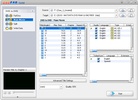
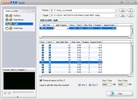
DVDFab is a Windows suite that brings together all the tools you need to work with any type of disc, whether DVD, Blu-ray, or even 4K UHD Blu-ray, in a single package. Additionally, it features tools that make it easy to copy, compress, rip, burn, and convert, as well as enhance videos with AI.

Lossless disc backup and copying

In DVDFab, you can make 1:1 copies of DVD, Blu-ray, and 4K UHD while keeping the original video, audio, and subtitles intact. With the copy feature, structures such as DVD-9 to DVD-9, BD-50 to BD-50, or BD-100 to BD-100 are preserved. It also allows compressing large discs into smaller versions (for example, DVD-9 to DVD-5 or BD-50 to BD-25) with virtually no loss of quality, which is ideal for saving space on hard drives or NAS devices. You can also save the copies in ISO format or in data folders so you can burn them again or play them on standalone players.

Advertisement
Remove ads and more with Turbo

Extract and convert discs to multiple formats

The ripping feature lets you convert any DVD, Blu-ray, or UHD disc to formats like MP4, MKV, or M2TS without re-encoding, preserving lossless audio tracks such as DTS-HD MA, Dolby TrueHD, DTS:X, or Dolby Atmos. You can also compress titles for mobile devices, reducing their size by 85–89% with minimal loss of quality, and convert them to more than 1,000 video and audio formats to adapt them for phones, tablets, consoles, or home theater systems. The app includes predefined profiles for brands such as Apple, Samsung, Sony, and Google, with advanced options for codecs, resolutions, frame rates, and audio channels.

Create custom discs and menus

The creator feature lets you convert digital videos (MP4, MKV, AVI, and more) into ready-to-burn DVD, Blu-ray, or UHD discs with custom navigation menus. You can choose from free menu templates and customize the background, fonts, colors, playback buttons, and thumbnails to give your recordings a professional look. You can also create copies between formats to adapt your library to different players: for example, upscaling a DVD to Blu-ray, Blu-ray to UHD, or downscaling UHD to 1080p Blu-ray.

Boost quality with AI tools

DVDFab features AI tools to improve the resolution, dynamic range, and overall quality of your videos. Among these are NVIDIA AI Enhancer, AI Upscaler, and AI HDR Upconverter, which allow content to be scaled to HD, 4K, or 8K and converted to HDR10 or Dolby Vision. These tools are useful for both modernizing old DVDs and preparing content for NAS media servers or home theater systems with 4K and HDR screens.

GPU-accelerated performance and metadata management

DVDFab leverages your graphics card to deliver the best performance with the lowest possible resource consumption. For example, it uses GPU acceleration (NVIDIA CUDA, AMD, or Intel Quick Sync) to drastically reduce copying, ripping, and conversion times. It can process a DVD or Blu-ray in a matter of minutes, depending on the size. In addition, the app syncs metadata such as title, cast, synopsis, genre, poster, and background art, and generates .nfo files compatible with media servers like Kodi, Plex, or PlayerFab, so your library is well-organized and easy to navigate.

Download DVDFab for Windows and centralize copying, compression, conversion, and enhancement of your DVD and Blu-ray discs in a single suite, with support for custom menus, AI video enhancement, and GPU acceleration for faster, higher-quality results.

Information about DVDFab 13.0.6.0

Basic information

Developer DVDFab
License Free
Category DVD
Rating All ages
Languages English
4 more

Security and privacy

Required permissions Not applicable
Advertising Not specified
See security and antivirus report
Why is this app published on Uptodown? (More information)

Download info

Downloads 436,487
Date May 13, 2026
File type EXE
Size 476.91 MB
SHA256 d416ae171031a9f6de9eeae6b713e445df071a50656d5eec76f1ab47d196f1ea
Advertisement
Remove ads and more with Turbo

Older versions

See more
exe 13.0.5.9 Apr 13, 2026
exe 13.0.5.8 Mar 19, 2026
exe 13.0.5.6 Jan 30, 2026
exe 13.0.5.5 Jan 28, 2026
exe 13.0.5.4 Jan 2, 2026
exe 13.0.5.3 Dec 12, 2025
Available for other platforms

Rate this App

Review the app
DVDFab icon

Rating

3.5
5
4
3
2
1
10 reviews

Users say

  • The app copies DVDs and converts them to MP4 reliably
  • Users praise its simple, easy-to-understand interface for making videos playable anywhere
  • Some report poor forum support, including being blocked after complaining about YouTube/StreamFab issues
This is an AI-generated summary based upon real user reviews.

Comments

See more
grumpyyellowcoconut12297 icon
grumpyyellowcoconut12297
2 weeks ago

The software works smoothly in most cases, and offers plenty of useful options. What I appreciate most is that the output quality stays very close to the original, and the program is updated regularly...See more

1
Reply
michaeldavis icon
michaeldavis
1 month ago

I've been using DVDFab to copy some old DVDs and convert them to MP4 files. Overall, it works quite well and the interface is easier to understand than I expected.

Like
Reply
jqf icon
jqf
in 2025

This product is very easy to use. I often use it to copy my DVDs and convert them to videos, which can be played anytime, anywhere. I love it very much

34
Reply
slowpurplerabbit75560 icon
slowpurplerabbit75560
in 2024

For anyone who intends to purchase a dvdfab product as part of the purchase, you can become a member of the technical forum for the products. The problem is that the person who runs the forum is a bad...See more

2
Reply
freshredsquirrel47949 icon
freshredsquirrel47949
in 2023

This software is just perfect for working with discs and multimedia!

2
Reply
mark11 icon
mark11
in 2016

I need the link to DVDFab 9.2.4.4 from 25.5.2016, as the new update does not work properly.

7
Reply
See more
Advertisement
Remove ads and more with Turbo
AnyDVD icon
Remove region codes from a DVD
DVD Shrink icon
Looking to rip a DVD9 to a blank DVD?
TMPGEnc Authoring Works icon
The easiest way to create your own DVDs and Blu-rays
Leawo DVD Ripper icon
Rip and record DVDs easily
WonderFox DVD Ripper Pro icon
Rip personal DVDs to most popular audio and video formats quickly
DVDSubEdit icon
Easily edit the subtitles for your DVD movies
Ulead DVD MovieFactory icon
Generate all kind of DVDs with HDTV support
Odin DVD Ripper icon
Convert movies in DVD format to any format you want
CapCut icon
Incredibly powerful and easy-to-use video editor
Adobe Premiere Pro icon
Video editing for professionals and beginners
DaVinci Resolve icon
The most powerful and complete post-production video tool for PC
Wondershare Filmora icon
Create and edit impressive videos in the easiest way possible
Canva icon
Create incredible posts for social networks
Gling icon
Edit videos with AI
Amuse icon
Generate visual content with AI locally
WaveSpeed icon
Generate images and videos with AI in seconds
CapCut icon
Incredibly powerful and easy-to-use video editor
SSuite Free TV-App icon
Streamlined TV-app magic, transforms any PC into a sleek viewing hub!
HEVC Video Extensions from Device Manufacturer icon
Play HEVC (H.265) encoded videos on Windows
FormatFactory icon
Conversion between video, sound and image formats
VLC Media Player icon
A powerful media player and streaming server
Adobe After Effects icon
The most advanced video-editing tool from Adobe
Adobe Premiere Pro icon
Video editing for professionals and beginners
VEGAS Pro icon
Professional video editing accessible to all